Convert Mailboxes to PDF
Turn a mailbox into PDFs, without starting a redaction project.
Last updated About 2 months ago
Convert is a standalone tool. You give it a mailbox, it gives you back a zip of PDFs, and that is the whole job — you do not need to create a project, and nothing is added to one afterwards.
Use it when you need readable, shareable documents rather than a redaction workflow: sending a mailbox to a solicitor, filing an archive, or producing a bundle someone will read outside RedactBox.
If you need to redact the messages, use a project instead. Convert does not redact anything — it reproduces your messages faithfully, including any personal data in them.
Getting there
Open Convert from the workflow list on your dashboard, or go straight to /convert.

The two jobs
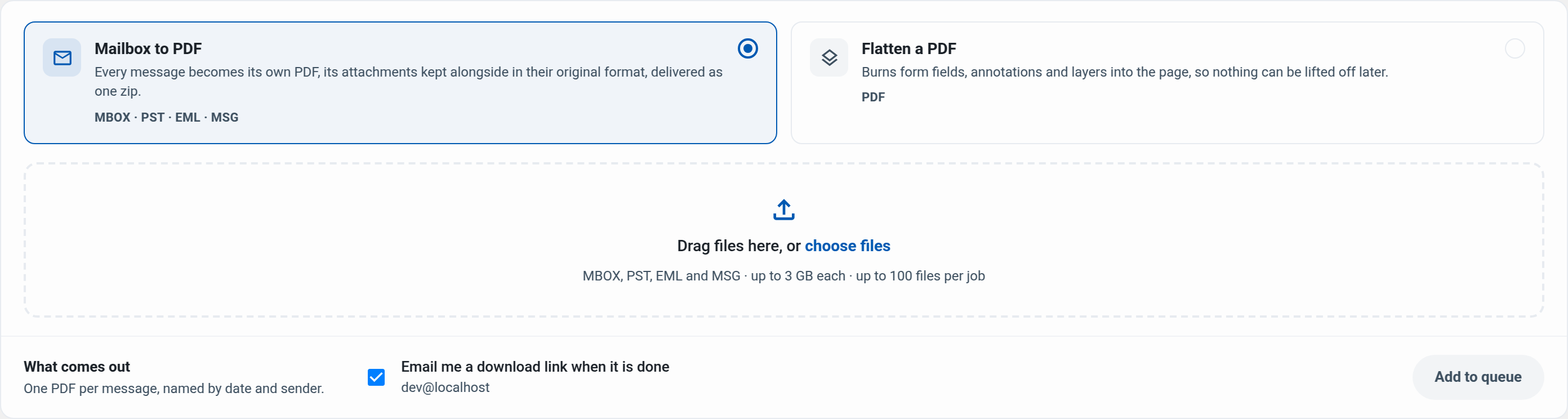
Mailbox to PDF takes MBOX, PST, EML and MSG files. Every message becomes its own PDF, named by date and sender so the output sorts itself, with that message's attachments in a folder beside it.
Flatten PDF takes a PDF that has form fields, annotations or layers and burns them into the page, so nothing can be lifted back off it.
Choose the job first, then add your files — the accepted file types change with the job.
Adding files
Drag files onto the panel, or click it to open a file chooser. You can keep dragging more on after the first — the list accepts drops too. Remove anything you added by mistake with the × on its row.
On the Free plan you can convert one file per job, up to 50 MB. On Professional it is up to 100 files per job, up to 3 GB each. A file over your plan's limit is refused when you add it, before any of it uploads.
What comes out
Every message becomes its own PDF. There is no combined-document option: assembling one PDF from thousands of messages needs the whole document held in memory at once, which is a good way to fail a large job late rather than deliver a large file.
Your zip contains:
A PDF per message, named
2026-05-14_sender-example.org_00041.pdf, so the files sort into date order on their own.Attachments in their original format. A spreadsheet stays a spreadsheet. Nothing is converted, so nothing is lost to a format change.
A folder per message that has attachments, holding that message's PDF and its files together. Messages without attachments sit at the top level.
Each message PDF also lists its attachments — name, type and size — and embeds a copy of each one.
Some PDF readers let you open an embedded attachment straight from the paperclip icon in the document. Support varies — Adobe Acrobat and Preview do, Chrome's built-in viewer does not. The originals are always in the zip regardless, so nothing depends on your reader.
While it runs
Conversion happens in the background. You can close the page — the job keeps going, and you can leave the Convert screen entirely.
The job list shows where each one is up to: a running job says which item it is on ("Processing item 1,204 of 4,182") rather than only a percentage, so a long archive tells you it is still moving.
If you started something by accident, Cancel stops it. Cancelling is not a dead end — your uploaded files are still there, so Run again costs one click rather than another upload.
When it finishes
You get an email with a download link, and the job appears in the list with a Download button. Open the job to see exactly what it produced: how many messages were read, how many PDFs were written, and how many attachments were extracted.
If some messages could not be converted
One unreadable message never fails the whole job. It is reported instead, grouped by reason, with example subjects so you can find it in the original mailbox:
Message has no readable content — usually a message with no body, such as an attachment-only message.
Message could not be read from the mailbox — the archive is damaged at that message.
Message is over the size limit for conversion — a single message over 50 MB.
Attachment is too large to embed in the document — over 50 MB. It is still extracted into the zip; only the embedded copy is skipped.
The counts are measurements, not estimates. "Messages read" counts everything the archive produced, including anything unreadable, so read minus converted always equals the number reported as failed.
How long your download lasts
Download links last 7 days from when the job finishes. The job page always shows the exact expiry.
Your uploaded source files are removed 7 days after upload. That means Run again works on a job you cancelled or one that failed, but not on one whose link has already expired — by then the sources are gone, and you would need to upload again.
Limits
A PDF being flattened must be under 500 MB, on any plan.
Was this helpful?
Still need help? Ask the team