Redaction Logs
Maintain a complete audit trail of all redactions for compliance and legal defensibility.
Last updated 9 months ago
RedactBox maintains a comprehensive audit log of every redaction made within your project. This is essential for regulatory compliance and responding to Subject Access Requests (SARs).
Why Redaction Logs Matter
Maintaining detailed records of redactions is a requirement under UK data protection law:
UK GDPR - Article 30 requires organisations to maintain records of processing activities, including how personal data is protected
Data Protection Act 2018 - Requires documentation demonstrating compliance with data protection principles
ICO Guidance - The Information Commissioner's Office expects organisations to evidence their data handling practices
If audited by the ICO or required to demonstrate compliance, the redaction log provides evidence of exactly what was redacted, when, and by whom.
Accessing Redaction Logs
Open your project in the RedactBox Console
Click the Redaction Logs button in the toolbar
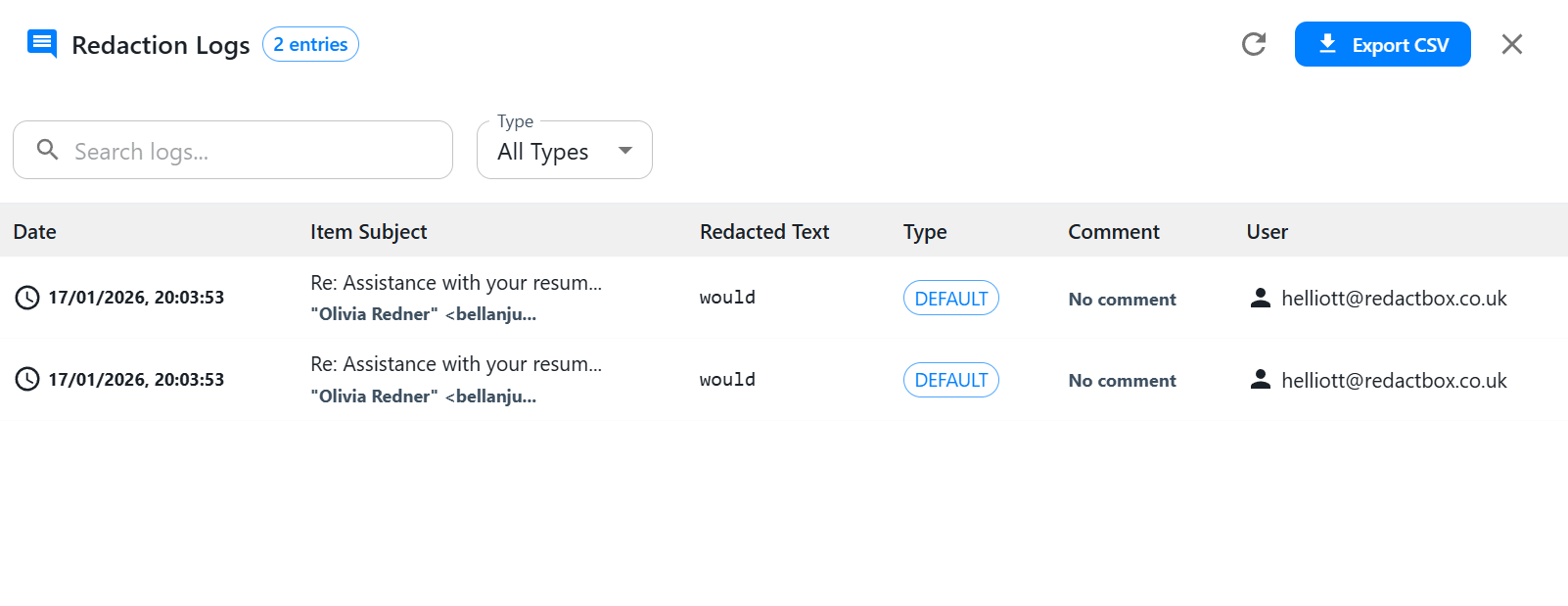
Log Details
Search, Filter and Export
Use the search bar to find specific redactions
Filter by Type using the dropdown menu
Click Export CSV to download the complete log
Tip: Export your redaction logs before archiving a project to maintain permanent records for compliance.
Best Practices
Add comments - Explain the reason for each redaction (e.g., "PII - email address")
Export regularly - Download CSV exports at key milestones
Review before production - Verify all required redactions before exporting final documents
Was this helpful?
Still need help? Ask the team